Remote Access Computer Repair


Fake Tech Support Scams – Fraudsters who use remote desktop support programs while scamming their victims have made it difficult for legitimate IT companies to convince users that they can be trusted.
Scammers have made an estimated tens of millions of dollars by tricking computer users into thinking their PCs are infected. The scammers “cold call” people, tell them that harmless error messages in the Windows Event Viewer are actually signs of a major problem, and then convince them to install a remote desktop program that gives the scammer access to their computer. The scammers pretend to fix the computer and charge its owner for the unnecessary and imaginary service. The same tricks can be used to steal users’ passwords and private information. Some even go so far as to hold the computer for ransom by encrypting all the files.
When you are looking for Tech Support make sure you initiate the first contact or phone call. Do not trust anyone who calls you out of the blue. As more people become educated as to the scam it will make it easier to hire a legitimate Remote Access Tech Support Service.
According to an article by Kiplinger.com about 3.3 million people are victimized by unsolicited technical support scams every year and the fraudsters rake in an estimated $1.5 billion. Here’s what to do if you’re one of them.
“You need to make sure the scammer doesn’t set up camp permanently. Disconnect the affected machine from the Internet immediately to keep the crook from accessing your computer while you batten down the hatches. Use another PC, tablet or smartphone to change your passwords, starting with financial sites and e-mail accounts. If you paid for the bogus service with a credit card, ask your card issuer to dispute the charges, and monitor your statements.”
Then call us – Tele Computers Services – our company has been around since 1991 and is one you can trust. We will get you back to where you were before the scam. We charge a flat fee no matter how long it takes to resolve the issue. You can watch on your computer screen as we do the work remotely. Our Remote Service Call also includes a full year license of WebRoot (a $39.95 value). WebRoot is one of the best anti-virus /malware programs ever invented. It will find things other name brand AV programs leave behind. This will ward off attacks in the future.
Compare the alternatives to our Remote Access Tech Support: Best Buy’s Geek Squad charges $150 for in-store Virus and Spyware removal and $250 if the technician makes a house call. Staples charges $160 in the store and $300 for a visit to the house.
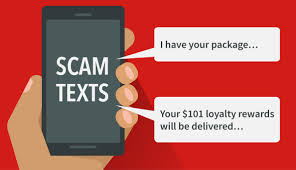
Top Text Scams

Texting is cheap and easy, and scammers are counting on the ding of an incoming text being hard to ignore. In 2022, they were right to the tune of $330 million in losses to text scams, as reported to the FTC’s Consumer Sentinel Network, with a median reported loss of $1,000. That’s more than double the 2021 reported losses and nearly five times what people reported in 2019. In fact, reports about text scams spiked in the first six months of the COVID-19 pandemic and have never returned to pre-pandemic levels.
But why do they work? Scammers use the speed of text communication to their advantage: they hope you won’t slow down and think over what’s in the message. Some messages promise a good thing – a gift, a package, or even a job. Others try to make you panic, thinking someone’s in your accounts. These are all lies and ways to take your money and personal information.
While there are countless varieties of text scams, the top five described below account for over 40% of randomly sampled text frauds reported in 2022. All five have one thing in common – they often work by impersonating well-known businesses.
1) Copycat bank fraud prevention alerts
Reports about texts impersonating banks are up nearly twentyfold since 2019. You might get a fake number to call about supposed suspicious activity. Or they might say to reply “yes or no” to verify a large transaction (that you didn’t make). If you reply, you’ll get a call from the (fake) fraud department. People say they thought the bank was helping them get their money back. Instead, money was transferred out of their account. This scam’s median reported loss was a whopping $3,000 last year. Worse still, many people report giving their Social Security number and other personal information to scammers, leading to possible identity theft.
2) Bogus “little gifts” that can cost you
A text about a free gift, reward, or prize may look like it came from a company you know – say, your cell phone company or a big retailer. But everything about this is fake. If you click the link and pay a small “shipping fee,” you just gave your credit card number to a scammer. Reports tell us fraudulent charges soon follow.
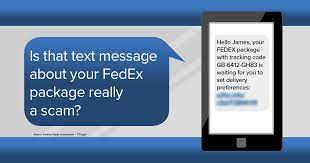
3) Fake package delivery problems
Expecting a package? There’s a text scam for you. Texts pretending to be from the U.S. Postal Service, FedEx, and UPS say there’s a problem with a delivery. They link to a website that looks real – but isn’t. If you paid a small “redelivery fee,” which many people reported, that was a trick to get your credit card number. People also reported giving these scammers their personal information, including Social Security numbers.
4) Phony job offers
Promises of easy money for mystery shopping at well-known stores like Whole Foods and Walmart are an old scammer favorite. Reports about bogus offers to make money driving around with your car wrapped in ads are also common. Reports show job scammers also target people who post their resumes to employment websites like Indeed. In most of these reports, scammers use checks that seem to “clear” but turn out to be fake to trick people into sending them money.
5) Not-really-from-Amazon security alerts
Like fake bank texts, texts from someone who says they’re “Amazon” look like automated fraud prevention messages. Often, they ask you to verify a big-ticket order you didn’t make. If you call the number in the text, you get a phony Amazon rep who offers to “fix” your account. People often report giving the rep remote access to their phone or computer so they can get things fixed and get their refund. But then the rep says a couple of zeros were accidently added to the refund, so they need you to return that money to them – often by buying gift cards and giving the cards’ PIN numbers.

In all these cases, reporting can help stop scam text messages:
Forward it to 7726 (SPAM). This helps your wireless provider spot and block similar messages.
Report it on either the Apple iMessages app or Google’s Messages app for Android users.
Report it to the FTC at ReportFraud.ftc.gov.
How can you avoid text scams?
Never click on links or respond to unexpected texts. If you think it might be legit, contact the company using a phone number or website you know is real. Don’t use the information in the text message.
Filter unwanted texts before they reach you. There are a few ways to block unwanted texts.
Here are a few tricks to identifying these fake email alerts.
First look at the FROM address. If it isn’t from the domain name you are expecting then most likely it is bogus.
In this example the FROM address shows it is from a bar and grill domain name.

Next look at the “Payload” link – the thing they are trying to get you to click on. In this case it is the Blue Verification box. If you hold your mouse over the link in the email you will see a popup window showing the path. Look at the domain name within that path. You will see it doesn’t not go to a logical email server address or domain name you recognize.

If the email were truly from your email provider these elements would be more logical.

The typical hijacked email account is usually used to send out hundreds of thousands of spam email to lists from all over the internet. Your inbox will begin to fill up with “undeliverable” notifications as what “looks to be” legitimate messages from you are returned when they cannot be delivered for some reason.
Recognizing these common signs of a scam could help you avoid one.
Links are to an official website of the United States government:
There are numerous instant messengers around, and at first glance, they hardly differ. However, if you take a closer look, distinctive differences become apparent beneath the surface, especially as far as security and privacy protection are concerned.
Overall, if security and privacy are your main concern, Signal is by far the secure service. While all three services use end-to-end encryption, Signal takes extra steps to ensure that the metadata information of its users is kept private and does not go out of its way to collect extra data on its users. However, most of your contacts probably don’t have it installed.

When it comes to texting, everyone is out to gather your information. Your cell phone provider has copies of everything you send, everyone you call and they do not have a policy to ever remove your data. In fact, you accept a user’s agreement whenever you install an update or use their service that allow this to happen. Plus, the CLOUD Act (2018) entitles US authorities to access data from US IT service providers (even if the data is not stored in the US).
Unfortunately, very few people have Signal installed so it is hard to get others to switch over. With so many text programs available it is getting difficult to keep track of all of it or convince others to install “yet another Text App.”
More people have Telegram installed than any other messenger service. So, it may be easiest to convert over and find most of your contacts are already listed. Telegram like most all of the Messenger apps can comb through your contacts and find people who are already in the service.
WhatsApp is owned by Facebook since 2014. And we all know how well Facebook abuses its user’s data.

Malware is on the rise for people who are interested in ChatGPT
You DO NOT need to install a program or software to test or use ChatGPT. Just go to the real website.
“ChatGPT malware” refers to malicious content distributed under the guise of ChatGPT (Chat Generative Pre-trained Transformer) – a chatbot developed by OpenAI. Since its inception in the autumn of 2022, ChatGPT has reached extreme popularity. At the time of writing, its user base has grown over 100 million. It is particularly prevalent that any enormously popular product/service is swiftly taken advantage of by cyber criminals and scammers alike.
Although ChatGPT is only available online (chat.openai.com), numerous fake desktop clients and mobile apps imitating this chatbot have been discovered. A variety of harmful and malicious software has been proliferated using “ChatGPT” as a disguise.
Additionally, OpenAI has released ChatGPT Plus – a paid premium service. This has opened the avenue for cyber criminals to offer “cracked” versions and create fake payment websites that target victims’ financial information.

At the time of writing, ChatGPT is exclusively an online tool – hence, there are no desktop or mobile applications available. However, over 50 “ChatGPT” apps have been discovered in the wild. Promoted on fraudulent ChatGPT/OpenAI Facebook pages, malicious websites, Google Play, and third-party Android stores – the applications include a variety of dubious and virulent content (e.g., adware, PUAs, trojans, etc.).
To summarize, the presence of an illegitimate ChatGPT app on a device could result in encounters with questionable/malicious ads or redirects, browsing activity tracking, data loss, severe privacy issues, significant financial losses, and identity theft.
Furthermore, since the creation of ChatGPT Plus – a premium service based on a monthly subscription, cyber criminals have started promoting fake payment sites for this service. The sites (regardless of whether used to proliferate malware or collect sensitive data) can perfectly mimic the graphics used by ChatGPT’s official website (chat.openai.com) and use typosquatting techniques to get the URLs as close to the original as possible.
The discovered phishing sites target users’ credit card information (e.g., names, card numbers, expiration dates, CVVs, etc.), which can then be used by the scammers to make unauthorized online purchases or perform other credit card related fraud.
Due to the prevalence of fake ChatGPT content, we strongly recommend caution. Therefore, pay attention to URLs and enter them with care; do not trust offers that sound too good to be true, and do not download/install software promoted by suspicious sources.
Work as if you are sitting in front of your work computer right from home or on your laptop anywhere in the world.
As Covid-19 spreads more and more people are considering working from home. But where to start?
There are several software packages that allow you to do this – some are free.
Fill out our contact form if you need immediate help setting this up. We can remote access into your PC any where in the world and set up Remote Access between your Home and Office devices. We do this all the time for our network and business clients. We can easily do it for you usually within one hour.
Look closely at any email you get that may be pretending to be from DocuSign.
As with all email that contain an attachment or a link – look closely before you click!